Tested, Ranked, and Actually Worth Your Time
I used to dread making presentations. Not because the ideas weren’t there — but because getting them onto slides in a way that didn’t look like a school project from 2009 took forever. Design decisions, layout tweaks, font pairings… it ate hours I didn’t have.
That changed when I started seriously testing the new wave of presentation tools that had landed over the past couple of years. Some of them are genuinely impressive. A few are overhyped. And a handful have become core parts of my workflow as someone who creates content, builds lead funnels, and occasionally has to present to rooms full of people who are silently judging my slide design.
This isn’t a list of tools I skimmed from a product page. I’ve used these. I’ve hit their limits. I know which one crashes on export and which one quietly upsells you halfway through your free trial. Here’s my honest breakdown.

What to Actually Look For in a Presentation Tool Right Now
Before we get into the list, a quick note on what actually matters — because most comparison articles get this wrong. The flashiest feature isn’t always the most useful one. What I look for:
- Speed: How fast can I go from idea to usable draft?
- Quality of Output: Does the output need a total redesign? Some tools generate slides that look like a ransom note.
- Ease of Use: What’s the learning curve? If I have to watch three tutorials, it’s not saving me time.
- Scalability: What does it cost at scale? Free tiers are great until you need to remove branding.
1. Decktopus AI — Best for Funnels, Sales Decks, and Lead Generation
Decktopus is the tool I keep recommending to people building funnels or selling something. Most presentation tools stop at “looking good.” Decktopus goes further — you can embed forms, calls-to-action, video links, and trackable elements directly into your slides. It’s less a “deck builder” and more a lightweight interactive landing page dressed up as a presentation.
What I noticed: the analytics are underrated. You can see where people drop off, which slides get the most attention, and whether your CTA is actually getting clicked. For affiliate marketers or anyone running lead gen, that’s genuinely useful data most tools don’t give you.

Pro Tip: The AI generation is solid — paste in your outline or a few bullet points and you’ll have a structured deck in a couple of minutes.
Best for:
- Sales decks and proposals
- Lead magnets and opt-in presentations
- Affiliate marketers who want clickable slide content
2. Canva — Best for Creators Who Live Across Multiple Platforms
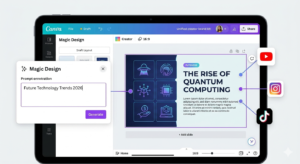
Canva isn’t primarily a presentation tool, and that’s exactly what makes it so good for creators. If you’re already making YouTube thumbnails, Instagram posts, and email headers in Canva, adding presentations to that workflow is frictionless. Everything lives in one place, brand kits carry across, and the Magic Design feature generates a starting layout from a headline in seconds.
Magic Write (their text generator) is useful for drafting slide copy quickly, though I’d still recommend reviewing what it produces rather than trusting it wholesale. The real strength here is design flexibility — Canva gives you more manual control than almost any other tool on this list.
Best for:
- YouTube creators and social media managers
- Anyone who already uses Canva for other content
- People who want design control alongside automation
3. Beautiful.ai — Best for Corporate and Investor-Facing Decks
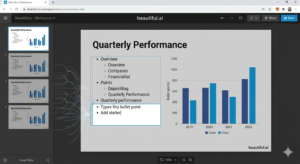
Beautiful.ai has a feature called Smart Slides — layouts that automatically adjust based on how much content you add. Drop in a fifth bullet point and the design adapts. It sounds like a small thing, but in practice it eliminates the most tedious part of slide design: the constant re-jigging when your content doesn’t fit.
The aesthetic is polished and professional. It won’t win design awards, but it won’t embarrass you in a boardroom either. For consultants, startup founders, or anyone who needs to present to investors, this is probably the most “safe” option on the list in terms of output quality.
Best for:
- Investor decks and pitch presentations
- Consultants and business professionals
- Reliably polished output without much fussing
4. Gamma — Best for Storytelling and Modern, Web-Style Presentations
Gamma is genuinely different — it creates presentations that feel more like interactive web pages. They scroll, they embed media natively, and they can be shared as links that anyone can view in a browser without needing a download.
The AI generation is among the best I’ve tested. Give it a topic, a rough outline, or even paste in a blog post, and it produces a structured, visually coherent output that’s often surprisingly close to usable. The formatting intelligence is notably better than most competitors.
Best for:
- Blog-to-presentation repurposing
- Online sharing and digital-first content
- Storytelling-heavy presentations
5. Presentation.ai — Best for Absolute Beginners Who Need Something Fast
I’ll be straight with you: Presentation.ai isn’t the most powerful tool on this list. But that’s also kind of the point. If someone tells me they’ve never made a presentation and they need one by tomorrow morning, this is what I’d send them to.
Type a topic, pick a style, and within about 30 seconds you have a complete deck. It’s fast in a way that nothing else quite matches. Think of it as the rough draft machine.
Best for:
- First-time users who need a quick starting point
- Low-stakes internal presentations
- Getting a serviceable deck fast
6. NotebookLM (Google) — Best for Research-Heavy or Course Content
NotebookLM is not a slide builder in the traditional sense. What it actually does is help you synthesise large amounts of source material—research documents, transcripts, or lengthy reports—into something structured. Upload them, and NotebookLM can produce an organised summary that maps naturally to a presentation structure.
You’ll still need to take that structured content and drop it into a design tool like Canva or Gamma for the actual visual work, but the research-organisation layer it provides is invaluable.
Best for:
- Online course creators
- Researchers and educators
- Turning large volumes of information into teachable content
7. Tome — Best for Visually Ambitious, Narrative-First Presentations
Tome is the tool I reach for when I want a presentation to feel like something, not just convey information. Where most tools default to bullet points, Tome leans into full-bleed imagery, sparse text, and a scroll-based format that feels closer to a beautifully designed magazine.
The generation quality is impressive — it doesn’t just structure your content, it makes deliberate visual choices about hierarchy and pacing. It has the highest “wow factor” of anything on this list when shown to someone who hasn’t seen it before.
Best for:
- Brand storytelling and creative pitches
- Portfolio presentations and personal projects
- Visually unique decks that stand out
Which Tool Should You Actually Use?
| Scenario | Recommended Tool |
|---|---|
| Sales funnel or lead magnet | Decktopus AI |
| Social media or YouTube content | Canva |
| Investor pitches/Corporate | Beautiful.ai |
| Turning long research into slides | NotebookLM + Gamma |
| Absolute speed / No design skill | Presentation.ai |
Frequently Asked Questions
Do I need design experience?
No. Most of them are built specifically for people who aren’t designers. Tools like Gamma and Decktopus handle layout decisions for you.
What’s the best free option?
Canva and Gamma both have genuinely usable free tiers. Gamma in particular lets you create a decent number of decks before hitting any limits.
Can I turn a blog post into a presentation?
Yes. Gamma is the best at this — paste in a URL and it does a solid job of restructuring the content into slides.
Final Thoughts
The gap between “I have an idea” and “I have a polished presentation” has never been smaller. What used to take a full afternoon now takes twenty minutes. Pick one tool that fits your most common use case, spend an hour learning it properly, and stop switching every time something new launches. Consistency with a good tool beats novelty with a great one.
